Data Dwell Blog

What Is Digital Asset Management Explained
At its core, digital asset management (or DAM) is a system for organising, storing, and distributing all your company's valuable digital files from one central library. It's the strategic answer to content chaos, transforming how your teams find, use, and share brand materials.
Think of it as a smart, secure hub for everything from your official logos and product images to videos, presentations, and sales material.
Taming Content Chaos With Digital Asset Management
Picture your company's shared drive for a moment. Is it a digital attic cluttered with duplicate files, vague filenames like Logo_Final_v2_USE_THIS_ONE.jpg, and outdated assets? If finding the correct version of a presentation feels like a frustrating treasure hunt, you're not alone.
This all-too-common scenario is content chaos, and it quietly costs your team hundreds of hours in lost productivity every year.
A DAM system imposes order on this mess. Imagine a professionally organised kitchen where every ingredient is labelled, stored in its correct place, and ready for the chef. A DAM does this for your brand's most important files. It's not just about storage; it's an intelligent system designed to manage the entire lifecycle of your content.
From Cluttered Folders to a Single Source of Truth
The main purpose of a DAM is to create a single source of truth. Instead of having countless versions of the same file scattered across different computers, email threads, and cloud folders, a DAM centralises everything.
This simple change ensures everyone in your organisation, from marketing and sales to external partners, is using the same approved, up-to-date materials. Every single time.
With a single source of truth, you immediately unlock a few game-changing advantages:
- Effortless Brand Consistency: Your branding stays uniform across all channels because everyone is pulling from the same logos, templates, and style guides. No more rogue branding.
- Boosted Team Efficiency: Your creative and marketing teams spend less time searching for files and more time creating work that actually makes an impact.
- Reduced Risk: You gain tight control over asset permissions and usage rights, which minimises the chance of non-compliant or outdated content being used publicly.
A DAM platform is more than just a place to put files. It's a strategic tool that safeguards brand integrity, accelerates workflows, and maximises the return on your content investment by making every asset discoverable and ready for deployment.
Essentially, a DAM breathes life into your content library. It meticulously ingests, catalogues, and secures every piece of content your company produces. Understanding what actually counts as a valuable file is the first step, and our guide on what digital assets are provides a detailed breakdown of the various types.
This structured approach means that when a team member needs a specific product image or video testimonial, they can find and use it in seconds, not hours. That's the real power of DAM.
The Core Features of a Modern DAM System
It's tempting to think of a modern Digital Asset Management (DAM) system as just a fancy online folder. While both can store your files, that's where the comparison ends. A DAM is the intelligent engine room designed to bring your entire content library to life, transforming a passive collection of files into an active, strategic tool that saves time and protects your brand.
Its power comes from a set of core features working in concert to create a secure, searchable, and efficient hub for all your brand's valuable assets. Without them, a DAM really would be just another cloud drive.

Intelligent Search Through Metadata and Taxonomy
The most fundamental job of any DAM is to make your assets instantly findable. This isn't about clever folder names; it's about metadata, the digital DNA of your files. Metadata is simply the descriptive information attached to an asset that tells you what it is and how to use it.
Think of it like the detailed label on a library book. It gives you far more than just the title; you get the author, publication date, genre, and a summary. In the same way, DAM metadata can include:
- Technical Data: File type, creation date, dimensions, and resolution.
- Descriptive Tags: Keywords that describe the content, like "summer campaign," "product launch," or "London office."
- Usage Rights: Expiration dates, licensing details, and any regional restrictions.
A taxonomy is the structured system that organises all this information, creating a consistent framework for how everything is tagged and categorised. When you combine rich metadata with a clear taxonomy, you unlock incredibly powerful and specific searches. Suddenly, you can find an image not just by its filename, but by searching for "vertical orientation, blue background, approved for social media use." Understanding why metadata is critical to your DAM success is the first real step to getting the most out of your system.
Eliminating Confusion with Version Control
Every creative team knows the pain of sifting through files named Campaign_Ad_Final_v3_USE_THIS_ONE.psd. That kind of chaos leads to mistakes, wasted effort, and the wrong versions getting published. A good DAM solves this completely with built-in version control.
When someone uploads a new version of an asset, the DAM doesn't create a confusing duplicate file. Instead, it stacks the new version neatly on top of the old one, keeping a complete revision history that you can access at any time.
A robust version control system ensures that team members always access the most current, approved version of an asset by default. This simple feature is a powerful safeguard against brand inconsistency and costly errors.
This means your marketing team can confidently pull assets for a new campaign, knowing without a doubt that they are using the latest approved content. And if they ever need to, they can roll back to a previous version with just a few clicks.
Securing Assets with User Permissions and Roles
Not everyone in your organisation needs, or should have, access to every single file. A modern DAM gives you granular control over who can view, edit, download, and share assets through user permissions and roles.
Administrators can create specific user groups, like 'Marketing Team,' 'Sales,' or 'External Agency,' and assign precise permissions to each one. This ensures sensitive or work-in-progress files stay protected, while approved, public-facing assets are easily available to the right people. It's a crucial feature for maintaining both security and brand governance.
How DAM Drives Tangible Business Growth
A Digital Asset Management (DAM) system is much more than a fancy filing cabinet; it's a strategic engine that delivers a real, measurable return on your investment. While the most obvious win is taming content chaos, the true value shows up when you connect its features to actual business outcomes. This is where a DAM stops being a 'nice-to-have' expense and becomes a competitive advantage that fuels growth.
The whole idea is pretty simple: when you centralise and intelligently manage your assets, you unlock efficiencies and opportunities that were previously buried under messy workflows. It's all about empowering your teams to work faster, smarter, and with total confidence in the materials they use every day.
Accelerating Marketing and Creative Workflows
One of the first things you'll notice is how a DAM drastically cuts down the time people spend just looking for files. It's not uncommon for creative and marketing pros to waste hours every single week trying to track down the right asset. That's valuable time that should be spent on strategy, creation, and actually getting work done.
A DAM gives that time back. With a single source of truth, a powerful search function driven by metadata, and instant access to approved content, your teams can find exactly what they need in seconds, not hours.
This speed has a direct impact on how fast you can get to market. Think about these common scenarios:
- Faster Campaign Launches: Your marketing team can pull together all the necessary visuals, copy, and videos for a multi-channel campaign in a fraction of the time it used to take.
- Quicker Sales Enablement: A sales rep can instantly grab the latest case study, product one-pager, or presentation, making sure they always have the most effective and compliant materials for their pitches.
- Efficient Content Repurposing: A DAM makes it incredibly easy to find existing assets to reuse or adapt for new purposes, which reduces the cost and effort of creating new content from scratch.
By eliminating the friction of searching for and validating assets, a DAM system directly boosts operational efficiency. This translates into faster project turnarounds, more agile marketing, and a greater capacity for creative output without increasing headcount.
This isn't just a minor tweak to your process; it fundamentally changes how quickly your organisation can jump on market opportunities.
Strengthening Brand Equity and Consistency
Your brand is one of your most valuable assets, and consistency is everything when it comes to building and protecting it. When different teams are using outdated logos, off-brand images, or incorrect messaging, it weakens your brand's impact and confuses your audience. A DAM acts as your brand's guardian.
By providing a single, controlled home for all official brand materials, you guarantee that every single public-facing piece of content is perfectly aligned. It doesn't matter if it's a social media post from an intern or a major ad campaign run by an external agency; everyone is pulling from the same approved library.
This centralised control ensures every touchpoint reinforces your brand identity, building trust and recognition with your customers over time. Without a DAM, keeping this level of consistency across a growing company is nearly impossible.
Mitigating Legal and Financial Risks
In a world of complex licensing agreements and usage rights, accidentally using an image after its licence has expired can lead to some serious legal and financial pain. Trying to track these details manually across thousands of assets is a recipe for disaster. This is another area where understanding what is digital asset management reveals its critical business value.
A modern DAM gives you robust tools to manage asset lifecycles and stay compliant:
- License Management: You can attach licensing information, usage rights, and expiration dates directly to each asset.
- Automated Alerts: The system can automatically flag when an asset's licence is about to expire or even block its use, preventing costly mistakes.
- Access Control: Granular user permissions mean only authorised people can access and use specific assets, protecting sensitive or restricted content.
This proactive risk management protects your business from legal trouble and frees up your budget for growth activities instead of unexpected fines. Ultimately, a DAM pays for itself not just through boosted efficiency, but also through the costly mistakes it helps you avoid.
DAM vs Cloud Storage and Other Content Platforms
It's a fair question, and one we hear a lot: "Isn't a Digital Asset Management (DAM) system just a more expensive Google Drive or Dropbox?"
On the surface, they seem similar; they all store files in the cloud. But their purpose and capabilities are worlds apart. The short answer? No, they are not the same. Not even close.
Thinking all file platforms are interchangeable is like thinking every tool in a workshop does the same job. You wouldn't use a sledgehammer to turn a screw. Simple cloud storage is great for basic file sharing, but a DAM is a specialised system, purpose-built to manage the entire lifecycle of your most valuable brand and marketing assets.
Cloud Storage Is for Storing Files
Platforms like Google Drive, Dropbox, and OneDrive are fantastic for personal file storage and straightforward team collaboration. Their main job is to give you a place to save documents and share them with a link. They're essentially digital filing cabinets; convenient, but not very intelligent.
The moment your team needs to manage thousands of brand assets at scale, you'll feel the pain of these limitations.
- Weak Search: Finding anything relies on knowing the exact filename or folder path. Searching for content inside the file? Forget it.
- No Lifecycle Control: They offer zero tools to manage usage rights, track versions properly, or handle asset expiry.
- Zero Brand Governance: Once an asset is downloaded, you have no control over how it's used. This is how old logos and unapproved images end up in the wild.
Cloud storage is the general-purpose hammer in your toolbox. It's incredibly useful for lots of everyday tasks, but it's absolutely the wrong choice for the specialised work of managing a brand's visual identity.
The diagram below shows just how much more a DAM handles beyond simple storage, covering the entire journey of an asset.
This flow makes it clear: a true DAM system integrates creation, management, distribution, and preservation into one cohesive lifecycle, which is something basic storage was never designed to do.
DAM Is for Managing Assets
A DAM, on the other hand, is the specialist's tool. It's not built to just store files; it's built to add intelligence and control to them. It understands that your company logo isn't just a JPG file; it's a valuable brand asset with specific usage guidelines, different versions, and a strategic purpose. This is the heart of what digital asset management is all about.
A DAM transforms static files into active, intelligent assets. It enriches them with metadata, governs their use with permissions, and tracks their entire journey from creation to archiving. This delivers strategic value far beyond what simple cloud storage can offer.
How DAM Compares to Other Systems
To really see where a DAM fits into your tech stack, it helps to compare it directly against the other content platforms your business probably uses. Each one has a very specific job to do.
Below is a quick breakdown of the most common systems and what they're really for.
DAM vs CMS vs PIM vs Cloud Storage
| System Type | Primary Purpose | Ideal Use Case |
|---|---|---|
| Digital Asset Management (DAM) | To centralise, manage, and distribute final brand and marketing assets. | A "single source of truth" for marketing, design, and sales teams to find and use approved photos, videos, and logos. |
| Content Management System (CMS) | To build, manage, and deliver content for a website. | Managing web pages, blog posts, and other front-end website content. Think WordPress or Squarespace. |
| Product Information Management (PIM) | To manage and enrich all the technical and marketing data for a company's products. | A central hub for product specifications, descriptions, and SKUs used to populate e-commerce sites and catalogues. |
| Cloud Storage | To store and share a wide variety of general files and documents. | Team collaboration on internal documents, personal file backup, and simple file sharing with individuals. |
So, while a CMS like WordPress is laser-focused on your website and a PIM is all about your product data, a DAM serves all of them.
It acts as the central, approved library that feeds the correct, on-brand images and videos into your CMS, your PIM, your social media channels, and your sales presentations. It's the foundational layer that ensures brand consistency and efficiency across your entire marketing ecosystem.
How to Implement a DAM System Successfully
Rolling out a Digital Asset Management (DAM) system isn't like installing another piece of software. It's a strategic project. Get it right, and it transforms your workflows; get it wrong, and you've just bought an expensive, very empty digital cupboard.
Success comes from careful planning, clear goals, and getting buy-in from the people who will actually use it every day. The work starts long before you ever see a demo. It begins with an honest look at your current mess and a clear vision for where you want to be. This groundwork is what separates a game-changing tool from a forgotten subscription.
Laying the Groundwork for a Smooth Transition
Before you can solve your content chaos, you need to know just how chaotic it is. The first step is a full content audit. That means mapping out where everything lives right now, from scattered shared drives and random cloud accounts to that one designer's hard drive. It's an eye-opening exercise that makes the case for change all on its own.
Once you know the scale of the problem, you have to define what success looks like. Set specific, measurable goals for the DAM. Are you trying to cut down the time teams spend searching for assets by 50%? Or maybe you want to completely eliminate the use of old, off-brand logos? Clear targets will guide every decision you make. For a more detailed walkthrough, our quick guide for a successful DAM implementation offers a brilliant, step-by-step checklist.
Building Your Business Case and Choosing a Partner
With your audit and goals in hand, you can build a business case that gets attention. This isn't about listing features; it's about connecting the DAM to real business results, like launching campaigns faster, maintaining bulletproof brand consistency, and dodging the legal risks that come with using the wrong images.
Choosing the right vendor is just as critical. You need a partner, not just a provider. Look for someone who gets your industry and understands your specific workflow headaches. They should offer solid support that goes beyond the initial setup, helping with the ongoing migration and user training that will ultimately determine if the project sinks or swims.
The diagram below shows how a DAM creates order out of chaos, acting as the intelligent hub that organises and enriches content coming from basic storage systems.
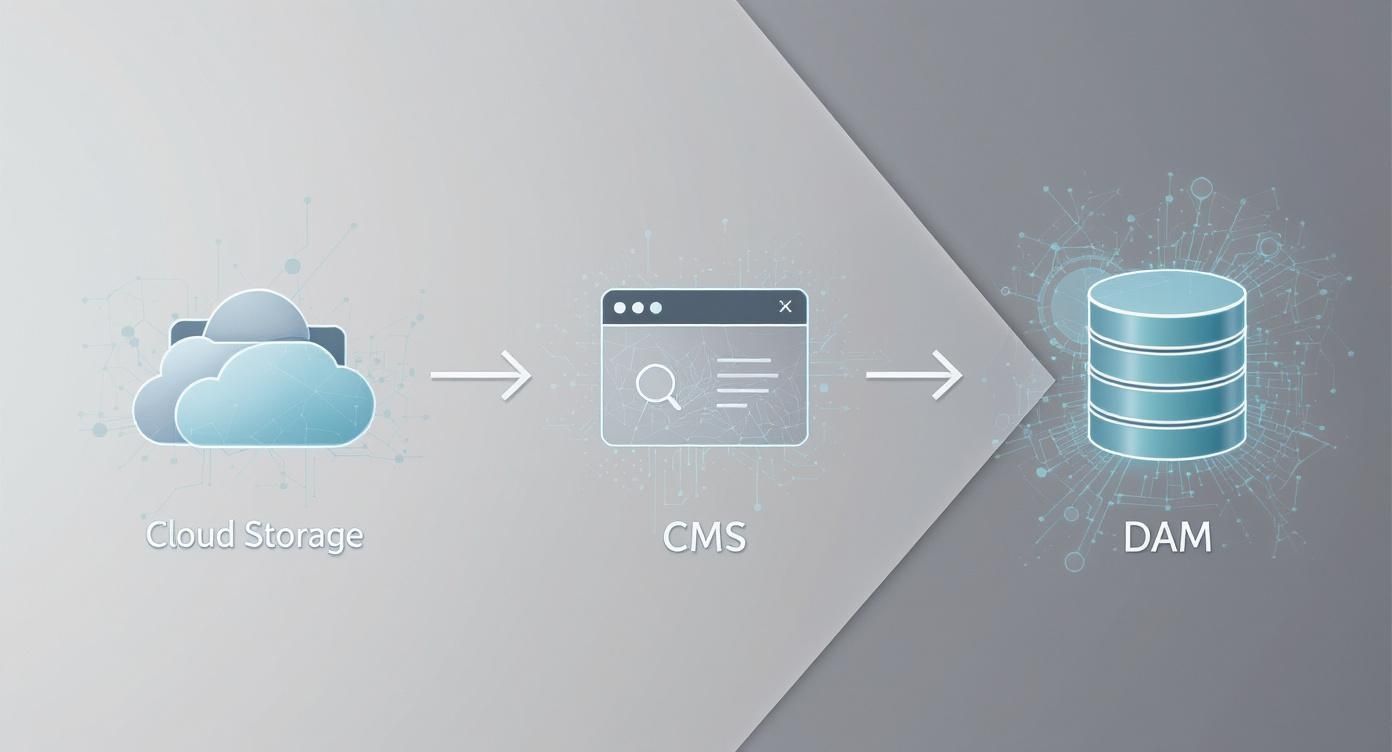
As you can see, the DAM is the final, essential stop where assets are tagged with metadata and governed by rules before being pushed out to a CMS or other channels.
Planning Migration and Fostering Adoption
Moving thousands of assets feels like a huge task, because it is. That's why you should tackle it in phases. Start by migrating the most valuable and frequently used content first. This gives your team an immediate win and lets them see the benefits right away, while you work on archiving older, less critical files in the background.
Finally, remember that a DAM is only as good as the number of people who use it. User adoption is everything. It takes more than a one-off training session to get people on board.
True adoption comes from showing teams how the DAM solves their specific, everyday frustrations. Frame it not as a new rule to follow, but as a powerful tool that makes their jobs easier and more effective.
Offer ongoing support, find champions within your teams who can help their colleagues, and constantly ask for feedback to make the system better. When your teams see the DAM as a solution built for them, it stops being just another software subscription and becomes a vital part of how they work.
The Future of DAM and Emerging AI Trends
Digital asset management has moved far beyond its early days as a simple, static library for brand files. It's quickly becoming an active, intelligent content engine that can anticipate your team's needs and automate complex jobs, a shift driven almost entirely by artificial intelligence. The future of DAM isn't just about storing assets; it's about making them smarter, better connected, and more predictive.
AI and machine learning are right at the centre of this change, evolving from novel add-ons to core functions. These technologies are tackling some of the most monotonous, time-sucking parts of managing a huge content library. This frees up your creative and marketing teams to stop being administrators and start focusing on strategy.
The Rise of the Intelligent DAM
The most visible impact of AI is the automation of metadata tagging. Instead of someone manually typing keywords for every new photo or video, AI-powered systems can now analyse the content and automatically apply relevant, detailed tags with impressive accuracy. This goes beyond the basics to identify objects, people, colours, and even the emotional tone of an asset.
This smart tagging makes every single asset infinitely easier to find, but that's just the beginning. The most forward-thinking DAM platforms are starting to offer predictive insights, looking at historical performance data to suggest which assets will most likely resonate in an upcoming campaign. This is a huge shift, turning the DAM from a reactive filing cabinet into a proactive strategic partner.
The next generation of DAM won't just answer "Where is our content?" but also "Which content will work best for this audience, on this channel, right now?"
Deeper Integrations and New Realities
Another key trend is the push towards deeper, more seamless integrations across the entire marketing tech stack. A modern DAM doesn't work in isolation anymore. Instead, it serves as the central content hub that plugs directly into other critical platforms, creating a fluid workflow from creation right through to global distribution.
Key integration points include:
- Creative Tools: Direct links with platforms like Adobe Creative Cloud, letting designers access and save assets without ever leaving their design environment.
- Marketing Automation: Pushing approved, on-brand assets directly into email marketing, social media scheduling, and advertising platforms.
- Content Management Systems (CMS): Ensuring websites and blogs are always populated with the latest, compliant imagery and video.
Finally, DAM systems are adapting to manage the next wave of digital content for emerging channels like augmented reality (AR), virtual reality (VR), and the metaverse. As brands start exploring these new frontiers, their DAM will be the critical system for storing, managing, and deploying 3D models and immersive experiences. This will only cement its role as the foundation of future brand interactions.
Got Questions About DAM? We've Got Answers.
When your team starts looking into digital asset management, a few practical questions always pop up. It's a big move, shifting from messy shared drives to a single source of truth, so it's natural to wonder about the investment of time, money, and team effort.
Let's break down some of the most common questions we hear from organisations thinking about making the switch.
How Much Does a DAM System Cost?
There's no single price tag for a DAM. The cost really depends on what you need: how many people will use it, how much storage you'll require, and which specific features are important for your workflows. Most providers offer a subscription model, usually billed annually.
You can find plans geared for small teams, but you'll also see enterprise-level solutions designed for unlimited users and complex integrations, which come at a higher price point. The key is to weigh the cost against the return you'll get from saving time, boosting productivity, and avoiding the expensive risks of using the wrong assets.
Which Departments Benefit Most from a DAM?
Marketing and creative teams are often the ones banging the drum for a DAM, but the benefits ripple out across the whole company. Once you have a central content hub, efficiency spreads everywhere.
- Marketing: Gets a huge boost in speed and consistency. They can launch campaigns much faster with easy access to on-brand assets.
- Sales: Can find and share the latest presentations, case studies, and product sheets in seconds. No more sending outdated materials to prospects.
- Creative and Design: Spends far less time digging for files or answering requests for logos. That means more time for actual creative work.
- IT and Legal: Can finally get a handle on user permissions, compliance, and asset lifecycles, reducing security and licensing headaches.
A DAM isn't just a marketing tool; it breaks down content silos and creates a secure ecosystem where every department can find and use the company's most valuable assets.
How Long Does It Take to Implement a DAM?
This really depends on the scale of the project. A straightforward setup for a smaller team with a clear plan can be up and running in just a few days or weeks.
On the other hand, a massive enterprise-wide project that involves complex integrations and moving terabytes of data from different places might take several months. A successful rollout comes down to having a clear plan, migrating assets in phases, and working with a DAM partner who provides real, hands-on support along the way.
Ready to see how a DAM can turn your team's chaotic workflows into a smooth-running content engine? Discover how Data Dwell provides a central source of truth that helps you find, share, and manage your assets with intelligent search, powerful automation, and seamless integrations. Learn more about Data Dwell.