Data Dwell vs Stockpress
Everything Stockpress has - plus portals, Asset Lifecycle
and AI search
Stockpress makes organising assets straightforward. Data Dwell makes using them powerful - with portals, Asset Lifecycle governance, deeper AI search and support that shows up.
$89/month vs Stockpress $99/month — with more included




Where Data Dwell goes further
Six areas where the gap between the two platforms is most material.
Portals from day one
5 branded portals on the free plan - with password protection, email gates, expiration and engagement tracking. Stockpress has no portal feature. For teams distributing to partners or clients, this is a fundamental gap.
Asset Lifecycle management
Every asset moves through Processing → Review → Embargo → Active → Expiration → Archive, with configurable rules, grace periods, rights-based locking and a full audit trail. Stockpress stores assets; Data Dwell governs them.
Deeper AI search
A conversational chatbot, visual similarity search, and search inside documents. Stockpress offers AI tagging and visual search - strong for images, but the comparison stops there.
Video transcription
Data Dwell automatically transcribes and captions video, making it fully text-searchable. Stockpress stores and previews video but doesn't surface what's inside it.
Your DAM inside AI tools
Data Dwell is an MCP server - search assets and action lifecycle decisions inside ChatGPT, Claude and Microsoft Copilot, within your permissions. Stockpress has no MCP capability.
Support mentioned by name
G2 Best Support 2026. The team handles migration personally and builds custom features - a different relationship than a support ticket system.
Both solid - built for different needs
Data Dwell
More than an asset library - AI-powered search, branded portals, full Asset Lifecycle governance and MCP integration, with a permanent free plan that includes enterprise features from day one. Best for teams distributing externally and managing content through its full working life.
Stockpress
Clean, intuitive and accessible. Stockpress covers DAM fundamentals well - tagging, versioning, facial recognition and visual search - at a competitive price. A solid choice for teams that mainly need organised internal storage without heavy distribution or lifecycle needs.
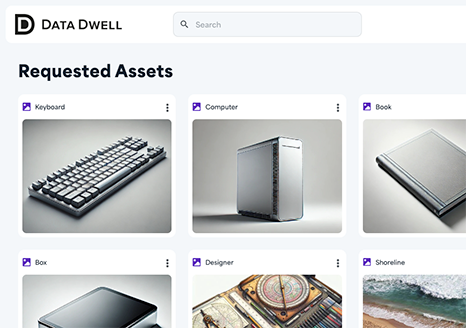
Portals that Stockpress doesn't have
Share curated collections with clients, partners and distributors - with password protection, email gates, QR codes, expiration dates and real-time engagement tracking. 5 portals on the free plan, unlimited from $165/mo. Stockpress has no equivalent - external sharing is link-based only.
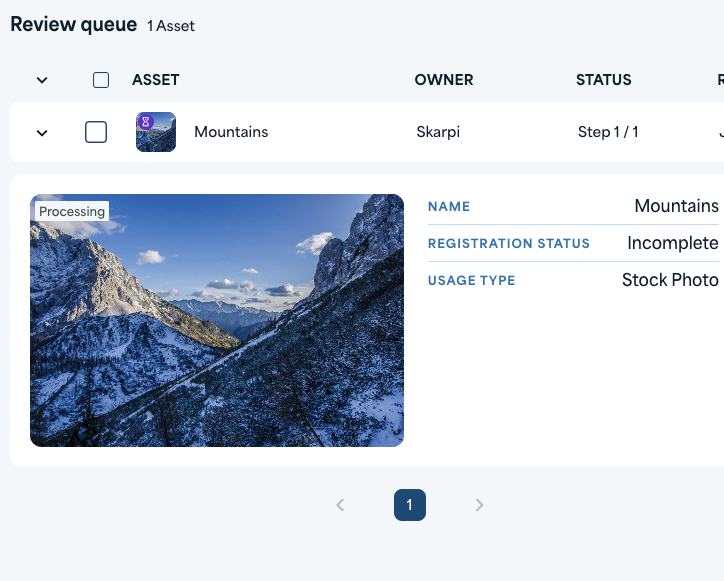
Asset Lifecycle
governance from
upload to retirement
Every asset moves through a defined state model: Processing → Review → Embargo → Active → Expiration → Archive. Each stage has configurable automation, grace periods and a complete audit trail, with assets locked automatically when rights expire. Stockpress has versioning. Data Dwell has governance.
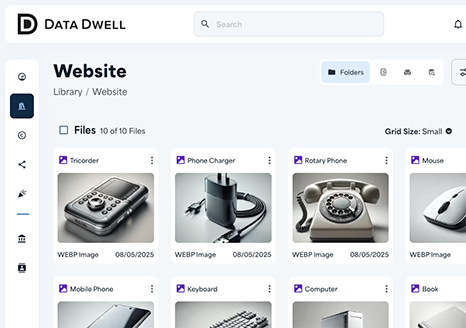
All core features
free, forever
Stockpress locks versioning, guest uploads and watermarking behind Pro+ plans ($175/mo). Data Dwell includes these on every plan - including the permanent free tier. No trial period and no credit card. Enterprise adds showcases, video transcription and IPTC/EXIF mapping.
Where the difference matters most
For marketing and commercial teams, these are the areas where choosing Data Dwell pays off.

Deeper search, including video
Conversational chatbot search, visual similarity, document search and automatic video transcription. Stockpress's AI search is image-focused - excellent for photography, narrower for mixed libraries.

Your DAM inside your AI tools
Data Dwell's MCP server puts your asset library directly inside ChatGPT, Claude and Microsoft Copilot - with permission-respecting access. Stockpress has no equivalent integration.

Bespoke builds, fast
Stockpress is self-serve SaaS. Data Dwell builds custom platforms - your branding, structure and integrations - and has delivered bespoke solutions in under 60 days.

Support that gets mentioned by name
Both platforms win G2 support badges, but Data Dwell's team is cited by name in reviews, handles migration personally and builds custom features. A different kind of relationship.
Feature comparison
A feature-by-feature breakdown based on publicly available information.
| Feature | Data Dwell | Stockpress |
|---|---|---|
| Pricing & Access | ||
| Free plan | Yes Free forever - 3 users, 3GB, 5 portals | Yes Free - 10 users, 3GB (no portals) |
| Entry paid price | $89/mo (250GB, unlimited users) | $99/mo (200GB, unlimited users) |
| Unlimited users | Yes All paid plans | Yes All paid plans |
| Free migration | Yes Free on any annual plan | Some automated migration |
| Feature gating | Minimal - core features on all plans | Yes Versioning, guest uploads, watermarking on Pro+ |
| Sharing & Portals | ||
| Branded portals / Digital Sales Rooms | Yes 5 free · 10 Starter · Unlimited from Pro | No Not available |
| Portal password protection | Yes | No |
| Portal email gate | Yes | No |
| Portal analytics & tracking | Yes Real-time engagement | No |
| QR code sharing | Yes | No |
| Expiration dates on links | Yes | Yes Pro+ only |
| Guest uploads | Yes | Yes Pro+ only |
| CDN distribution | Yes | No |
| AI & Search | ||
| AI-powered contextual search | Yes | Yes |
| Conversational AI / chatbot search | Yes | No |
| Facial recognition | No | Yes Essential+ plans |
| Search within documents | Yes | No |
| AI auto-tagging | Yes | Yes |
| Video captions & transcription | Enterprise plan | No |
| Location mapping | Yes | No |
| Workflow & AI Integrations | ||
| Asset Lifecycle management | Yes Full state model with rules, grace periods, asset locking, audit trail | No |
| MCP server (ChatGPT, Claude, Copilot) | Yes Search assets & surface lifecycle actions in AI tools, within permissions | No |
| Asset Management | ||
| File versioning | Yes All plans | Yes Pro+ only |
| Duplicate detection | Yes | Yes |
| Watermarking | On request | Yes Pro+ only |
| IPTC / EXIF metadata | Yes | Yes Premium only |
| Integrations | ||
| Adobe Creative Cloud | Yes | Yes |
| Figma | Yes | No |
| API access | Yes | Yes |
| Permissions & Security | ||
| Role-based permissions | Yes | Yes |
| SSO / SAML | Yes | Yes |
| Audit trail | Yes Unlimited on paid plans | Reports on Pro+ |
| GDPR | Yes | Yes |
| Support | ||
| Bespoke builds & customisation | Yes Custom platforms, integrations, branding | No Self-serve SaaS |
| G2 Quality of Support | Yes G2 Best Support 2026 | Yes G2 Best Support badge |
How pricing compares
Both offer free plans and unlimited users on paid plans. The differences are in what you actually get.
- Users 3 free
- Storage 3GB
- Portals 5 free
- Versioning, AI search, access control All plans incl. free
- Paid plans from $89/mo
- Free migration Any annual plan
- Find the right plan for you
- Users 10 free
- Storage 3GB
- Portals Not available
- Versioning, guest uploads, watermarking Pro+ only ($175/mo)
- Paid plans from $99/mo
- Asset Lifecycle Not available
* Pricing correct at time of publication. Always verify on vendor pricing pages before purchasing. Last updated July 2026.
Real reviews, real teams
"We worked with Data Dwell to create a tailored solution, implemented a set-up and roll out process company-wide and have been very happy with the results. My users say the solution is easy and intuitive and that's really what we needed."
"It's simple. It's easy to scale. And at a good price point. I would definitely recommend them - they go the extra mile to keep me happy."
"Data Dwell Digital Asset Management makes organizing and retrieving assets simple. The interface is user-friendly and intuitive. It helps improve workflow efficiency and collaboration."
"Outstanding professionalism, knowledge, flexibility and help throughout the whole process, from day one until today. Having such a great working solution for all of our assets has been great, and the fact that it's so flexible and can be changed for our wishes is fantastic!"
Frequently asked questions
Is Data Dwell a good alternative to Stockpress?
Yes. Both have free plans, but Data Dwell adds branded portals (Stockpress has none), Asset Lifecycle governance and an MCP server, and includes versioning on all plans. Video transcription is included on Enterprise.
What does Stockpress not have that Data Dwell does?
Branded portals / Digital Sales Rooms, Asset Lifecycle management, video captions & transcription, conversational AI search, location mapping and MCP server.
How does Data Dwell pricing compare to Stockpress?
Data Dwell starts at $89/mo vs Stockpress $99/mo. Data Dwell includes versioning and guest uploads on all plans; Stockpress locks these to Pro+ ($175/mo).
Can I migrate from Stockpress to Data Dwell?
Yes. Data Dwell offers free migration on any annual plan, handled personally by the team.
Switching from Stockpress?
Free migration on any annual plan — handled personally by our team.
Start free - no trial limits, no credit card
Data Dwell's free plan includes portals, AI search and enterprise-grade access control. No expiry, no pressure to upgrade.
Also compare: Bynder · Canto · Brandfolder · Dash · All comparisons